Urdu Stylish Text Not Copying Correctly? Here’s the Fix
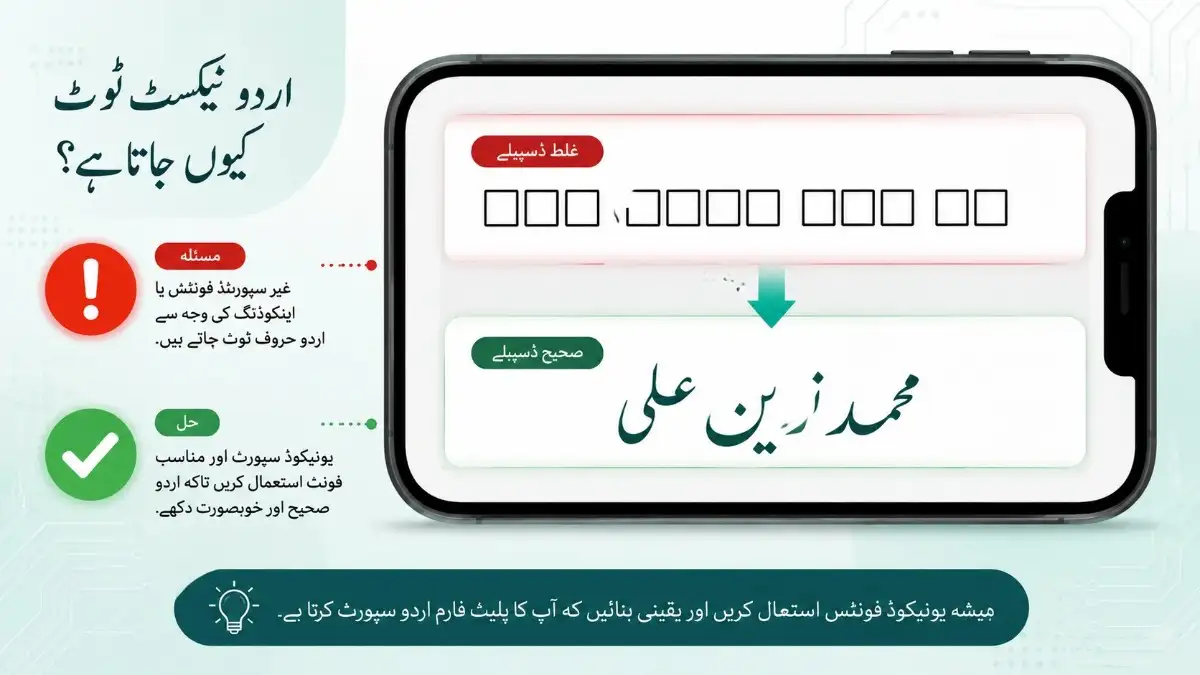
You copy your Urdu stylish name, paste it into WhatsApp or Instagram, and it comes out as boxes, reversed letters, or missing characters entirely. This is one of the most common complaints with Urdu stylish text, and it almost always traces back to one of four specific causes — all fixable in under a minute.
Why Is My Urdu Stylish Text Not Copying Correctly?
Urdu stylish text usually fails to copy correctly because of one of four issues: a missing font on the receiving app, hidden Arabic Presentation Form characters instead of standard Urdu Unicode, a character limit silently truncating the name, or a browser clipboard glitch on older Android devices. Each has a distinct fix, and none of them require reinstalling anything or switching devices.
Cause 1: The Text Uses Arabic Presentation Forms Instead of Standard Unicode
Some websites and forwarded WhatsApp messages use Arabic Presentation Forms (Unicode range U+FE70–U+FDFF), which look identical to standard Urdu letters on screen but render as boxes or broken shapes once pasted into certain apps or games. This is the single biggest source of “my Urdu text looks fine here but breaks there” complaints.
The fix: only copy Urdu text from a generator that outputs standard Unicode Arabic block characters (U+0600–U+06FF), which is universally supported across Android, iOS, WhatsApp, Instagram, and Facebook. The Urdu Stylish Names generator outputs exclusively from this standard range, avoiding the presentation-forms problem entirely.
Cause 2: The App’s Character Limit Is Silently Cutting Your Text
WhatsApp allows 25 characters for a display name, Instagram allows 30, and Free Fire caps nicknames at just 12 — pasting a longer styled name gets it truncated without any warning, which often looks like a “copying” failure when it’s actually a length problem.
The fix: count your final styled text, symbols included, against the platform’s actual limit before pasting. A name that looks complete in the generator preview can lose its closing bracket or last letter the moment it’s saved on a stricter platform like Free Fire.
Cause 3: Your Keyboard or Browser Is Auto-Correcting the Text
Some Android keyboards and older browser versions auto-correct or reorder Arabic-script characters during copy-paste, especially when copying from a webpage instead of a dedicated text field. This shows up as letters appearing in the wrong order or certain diacritics disappearing entirely.
The fix: always use the generator’s dedicated Copy button rather than manually selecting and copying text with your finger. The Copy button copies the exact Unicode string directly to your clipboard, bypassing manual text-selection issues that trigger keyboard auto-correction.
Cause 4: The Destination App Doesn’t Have the Right Font Installed
Free Fire and some older or lower-end Android games don’t load the Nastaliq or Arabic font ranges needed to display Urdu script, so even a perfectly copied, correctly formatted name shows as boxes purely because the receiving app can’t render it.
The fix: for gaming platforms specifically, use a game-tested generator like the Free Fire Urdu Name Generator, which outputs styles confirmed to render inside Free Fire’s font package, rather than the general Urdu styles built for social apps.
Platform-by-Platform Troubleshooting Table
| Platform | Common Issue | Fix |
| Name gets cut at 25 characters | Shorten before pasting | |
| Bio field wraps oddly | Check 150-character bio limit | |
| Free Fire | Boxes instead of letters | Use game-specific Urdu generator |
| TikTok | Name compresses at small size | Use short, minimal-decoration styles |
| Older Android browsers | Reordered letters | Use Copy button, not manual selection |
A Quick Test Before You Commit
Before setting any Urdu stylish name permanently, paste it into the app’s preview screen first — most platforms show a live preview before you save. If any part shows as a box or looks reordered, go back to the generator and try a shorter or simpler style rather than assuming the app is broken.
Frequently Asked Questions
Q: Why does my Urdu name look fine on my phone but broken on my friend’s phone? This usually means the text uses Arabic Presentation Forms rather than standard Unicode — some devices render both correctly, others only support the standard range.
Q: Is this a problem with WhatsApp or Instagram themselves? No, both apps fully support standard Urdu Unicode. The issue is almost always in how or where the text was originally copied from.
Q: Why does my Urdu name work on Instagram but not Free Fire? Free Fire uses a more limited font package than social apps and doesn’t load the full Arabic script range. Use a game-specific Urdu generator instead of a general one.
Q: Does this affect TikTok too? Yes — TikTok has its own 24-character limit and rendering behavior. The TikTok Urdu Names generator is built specifically around TikTok’s display constraints.
Q: How do I know if text is “safe” Unicode before I paste it? If it comes from a dedicated generator’s Copy button rather than a manual copy off a random webpage or forwarded message, it’s almost always safe standard Unicode.
Q: Can I fix already-broken text by retyping it? Usually yes — clear the field completely and paste a freshly generated version rather than trying to edit the broken text directly.